Melee Weapons
Melee settings are defined in melee_descriptions_library_pve. This file has the list of actual melee descriptions. Each melee weapon description is a separate file (such as melee_chainsword_desc).
Melee Description fields
- Body Desc uid — model of the firearm. This field can be empty if the melee weapon is part of the character model.
- Health damage, heavy hit damage — base damage amount of the melee weapon. Each combo defines its actual damage as a percentage of this base.
- Owner TPL — the character who holds this weapon.
- Melee Detector settings — describes melee detectors. A melee detector consists of a starting bone, an ending bone, and offsets for each bone. Starting and ending bones can be the same. The bone represents what is supposed to hit when a melee strike is played. Example: for a shoulder attack detector, the bone is
clavicleR.
Combo parry settings
- Parry anim link, Riposte anim link, Abort anim link — records from animation_table for animation ordering.
- Parry stance anim link — animation played when entering the parry stance.
- Parry/Riposte anim link override per enemy — selection of animation based on the enemy's archetype UID.
- Abort strike possibility — time window allowing the interruption of a melee strike with parry.
- Parry enabled duration — time after entering the parry stance that counts as parry.
- Riposte enabled duration — time after entering the parry stance that counts as riposte.
- Parry direction angle — the angle between actor forward and incoming hit direction that allows parry.
- Riposte damage settings — damage dealt to the riposted enemy.
-
Combo blueprint desc — the blueprint that describes combos for this melee weapon. Every combo blueprint starts with a Local start node. The Melee Combo Start node has outputs for
LIGHT_TAPandLIGHT_HOLD. The Melee Combo Strike node is used to play the actual attack and has the same output pins.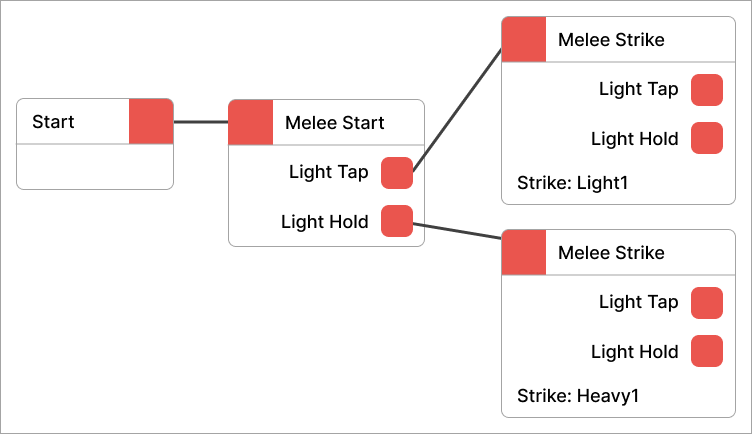
-
Combo slowdown settings — can be
null. Describes how time slows down during the strike. - Strike settings:
- Need ignore inputs and targets — uses user forward as the strike direction.
- Unconstrainable — incoming attacks stop constraining to the actor during a melee strike.
- Constrain offset — when greater than zero, actor moves towards a point with this offset.
- Constrain weight — from 0 to 1, how much actor is pushed towards the offset point. 1 means it is guaranteed that by the end of the animation the actor reaches the offset point.
- Target weight — from 0 to 1, how much the target influences a constrain trajectory.
- Rotation weight — from 0 to 1, how hard the actor rotates towards the target.
- Constrain max linear speed — maximum speed allowed for the actor during constraining.
- Max damaged actors — the number of actors a single melee strike can damage.
- Animation link — the animation from
animation_tablethat is used for this melee strike. - Melee detectors — melee detectors to activate during this strike.
- Main/Extra damage settings — damage applied to struck targets.
Warhammer 40,000: Space Marine 2 © Games Workshop Limited 2024. Space Marine, the Space Marine logo, GW, Games Workshop, 40K, Warhammer, Warhammer 40,000, 40,000, the 'Aquila' Double-headed Eagle logo, and all associated logos, illustrations, images, names, creatures, races, vehicles, locations, weapons, characters, and the distinctive likeness thereof, are either ® or TM, and/or © Games Workshop Limited, variably registered around the world, and used under licence. Focus Entertainment and its logos are trademarks, registered or not, of Focus Entertainment. Saber Interactive and its logos are trademarks, registered or not, of Saber Interactive. Powered by Wwise © 2006 – 2024 Audiokinetic Inc. Havok software is © 2024 Microsoft. Uses Bink Video. Copyright © 1997-2024 by Epic Games Tools LLC. All rights reserved to their respective owners.